HC - OneClick API - Installments
API documentation for implementing the Home Credit interface in e-shops.
Version of documentation: 1.28.2
Version History
| Version | Release | Release date | News |
|---|---|---|---|
| 1.28.2 | CS133 | 8.10.2025 | replacement of endpoint for change application state |
Important Notes
List of attributes switching from required to optional:
- request.customer
- request.customer.firstName
- request.customer.lastName
- request.customer.fullName
- request.customer.email
- request.customer.phone
- request.customer.addresses
- request.customer.addresses.city
- request.customer.addresses.streetAddress
- request.customer.addresses.streetNumber
- request.customer.addresses.zip
- request.customer.addresses.addressType
- request.merchantUrls.notificationEndpoint
In case of any question, please contact our integration department (integrace_eshop@homecredit.cz).
⚠️ IMPORTANT NOTE: Resource calls made from Slovakia MUST use appropriate dedicated .sk endpoints. E.g.
https://api.homecredit.sk/financning/v1/applications
Getting started
This online document describes Home Credit (HC) One-Click API - the means for partner e-shops through which they can offer their customers the benefits of one of Home Credit's payment methods.
The aim of here described services is to allow customers the smooth running through the process of an online purchase. The services that allow achieving this goal are divided into the following groups:
| Group of services | Purpose |
|---|---|
| Security | Security rules and principles |
| Application resources | Resources that allows processing of application during its whole life cycle |
| Installments calculator resources | Resources that allow partner e-shops to implement an installment calculator on their websites |
| Merchantsite resources | Resources that should be developed and exposed by a partner to allow HC asynchronously inform it about important changes regarding particular applications and orders |
| Health check | Health check usage description |
Basic implementation
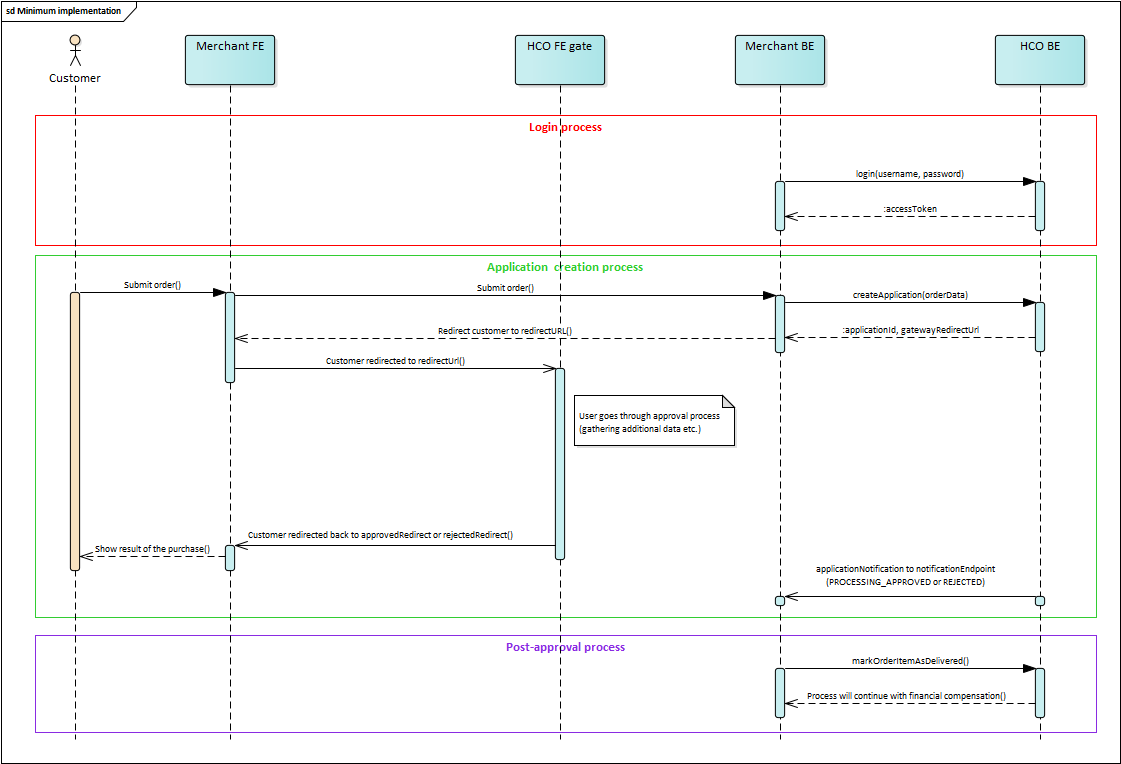
The basic and minimum way how to implement HCO API is to at least implement:
- Login
- Partner must be authorized to be able to access the most resources
- Create application
- Partner calls this resource to start the loan approval process by creating an
application.Applicationitself and its ID are essential for successful process completion.
- Partner calls this resource to start the loan approval process by creating an
- Redirect handlers.
- Special URLs for customers that shows payment success or rejection (more info here).
- Application notification
- This endpoint has to be exposed on your side to allow HC back-end to asynchronously notify you about the important changes regarding particular applications.
- Mark order items as shipped/delivered
- Home Credit does not start the process of financial compensation unless the
orderis marked asSHIPPEDorDELIVERED.
- Home Credit does not start the process of financial compensation unless the
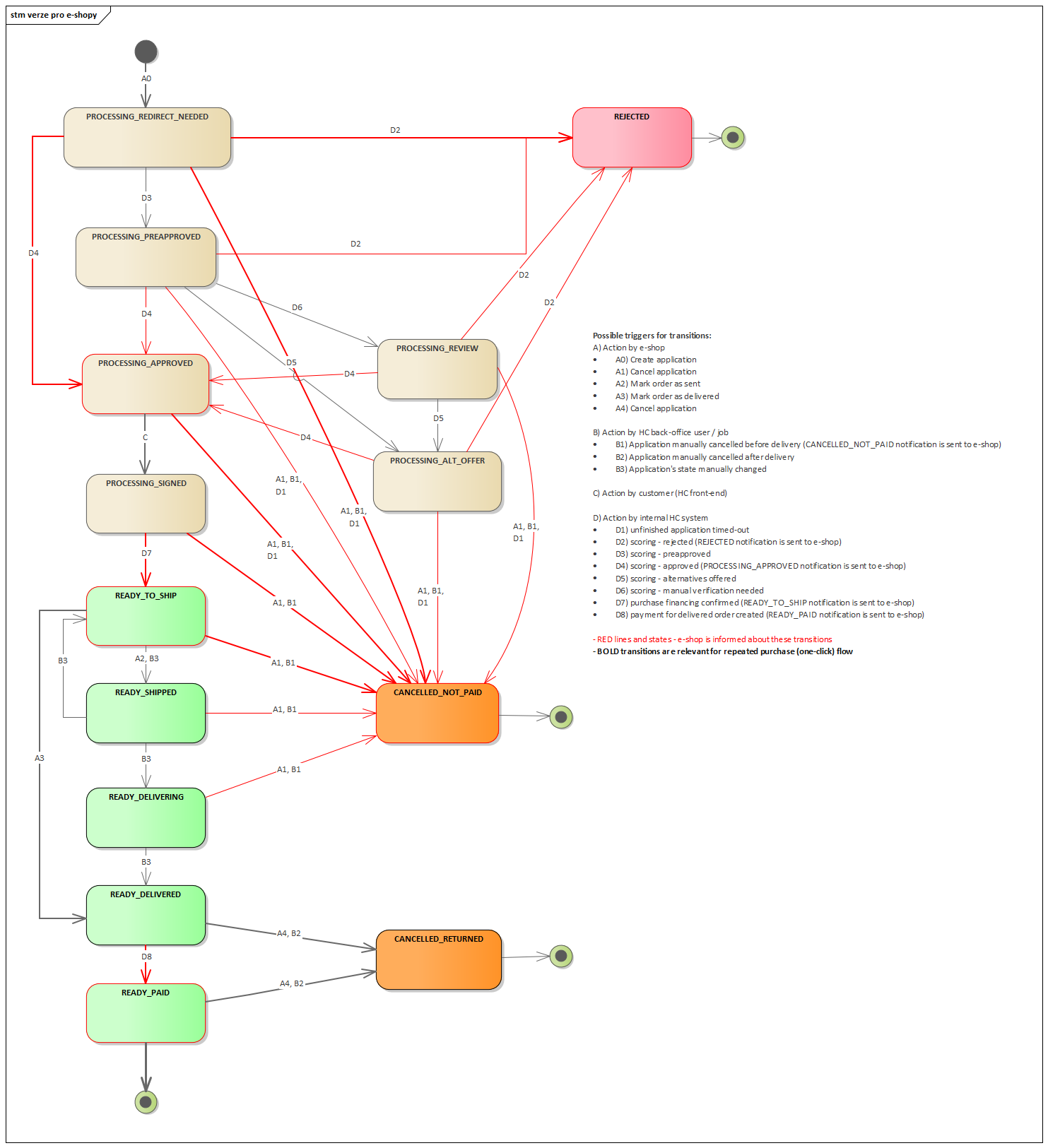
It is necessary to fill in all attributes marked as 'required' in the request. Filling optional parameters will result in a better application approval rate. Partner should always consider filling as many attributes as possible.
Parameters added to your return URLs
- During redirection of the customer from Home Credit's front-end back to e-shop (to one of the provided URLs -
approvedRedirectUrl,rejectedRedirectUrl) there are some potentially useful information about a customer's outcome in Home Credit's front-end added: orderNumber(string) - E-shop's internal order number provided within API call of Create applicationwithdrawal(boolean) - True when the customer's purchase is financed directly from his already existing revolving loan; false when a new contract is being createddownPayment(number) - Value of down payment, usually set to 0stateReason(enum) - Application substateapplicationId(string) - HCO application identifiercheckSum(string) - hashed message- e.g.
http://youreshop.cz?orderNumber=0606104036&stateReason=PROCESSING_SIGNED&downPayment=100000&checkSum=443E150D3406F6A8DC62C1DB224AFDD84FA9907071BB1AD9B2C7701031793662191501B26AADF3A31361341EA176C80B23D8A9A5E5B5219538289945FE0C20A7&applicationId=01-11b00a1ef1&withdrawal=false
Javascript widget integration
In order to use Home Credit's javascript widget as an installment calculator, your e-shop back-end has to be configured properly. How to do it is currently described in our on-line repository (currently written in Czech).
Documentation principles
-
attributes in request/response object are optional unless stated otherwise (
requiredflag under attribute name) -
a required attribute in an optional object means, that if an optional object is specified, it must contain the required attribute.
-
all values in request/response attributes are just examples, except for enum values - these are the only possible values for the given attribute.
-
documentation adheres to semantic versioning, which makes a distinction between major, minor, and patch versions.
Naming conventions
-
we use camelCase for all object and attribute names
-
we use CAPITAL_UNDERSCORE for enum values
-
we use plural in resource names
Home Credit REST API principles
Request restrictions
Please, keep in mind following restrictions regarding requests:
-
Maximum request size is 10 MB.
-
Maximum size of accepted single file is 500 kB.
-
Here is the list of supported files:
| MIME type | Example(s) |
|---|---|
| application/pdf | |
| application/vnd.openxmlformats-officedocument.spreadsheetml.sheet | *.xlsx |
| application/vnd.openxmlformats-officedocument.wordprocessingml.document | *.docx |
| application/vnd.openxmlformats-officedocument.presentationml.presentation | *.pptx |
| application/vnd.ms-excel | *.xls, *.xlt, *.xla |
| application/msword | *.doc, *.dot |
| application/vnd.ms-powerpoint | *.ppt, *.pot, *.pps, *.ppa |
| plain/text | *.csv, *.txt |
| image/jpeg | *.jpg, *.jpeg |
| image/png | *.png |
| image/gif | *.gif |
API calls limits
When partner reaches API calls limit (partner calls the API more times than is partner's quota), he receives HTTP error 429. To inform partner about limits we use following response headers:
-
X-Rate-Limit-Limit- The number of allowed requests in the current period -
X-Rate-Limit-Remaining- The number of remaining requests in the current period -
X-Rate-Limit-Reset- The number of seconds left in the current period
Versioning
We use API version in URL (e.g. https://api.homecredit.cz/financing/v1/applications). Minor changes and patches (see below) that don't break backwards compatibility do NOT increase API version, e.g. they MAY happen without prior notice and your application should be ready to handle them.
Response encoding
Unless stated otherwise, all responses are sent as Content-Type: application/json; charset=utf-8
HTTP status codes
We use following status codes throughout the API, except for OAuth flow when response codes are prescribed in RFC
-
200
OK- request was successful -
201
Created- request was successful and resource was created -
202
Accepted- request has been accepted for processing, but the processing has not been completed -
204
No Content- we accepted partner's request but there is nothing to return (e.g. response is empty) -
400
Bad Request- syntax error, e.g. request is missing required parameters/attributes or parameter values are of incorrect type -
401
Unauthorized- partner is not authorized -
403
Forbidden- access denied (e.g. user / application is not allowed to use the resource) -
404
Not Found- resource could not be found -
405
Method Not Allowed- specified method is not allowed for resource -
422
Unprocessable Entity- business (semantic) errors. Request is well-formed, but cannot be processed (e.g. payment due date is in past). Errors are specified in response body (see below) -
429
Too Many Requests- partner exceeded the rate limit (see section API calls limit above) -
500
Internal Server Error- something went wrong on our side -
503
Service Unavailable- there is planned service outage
Error handling
Besides HTTP status codes, which are the main indication if something goes wrong, we also use errors object to report more details about errors.
Errors object example:
{
    ...

    errors: [
        {
            "code": "ERR_100",
            "message": "Invalid contract number",
            "severity": "ERROR",
            "attribute": "partyAccount.accountNumber",          // optional
            "ticketId": "UAT1:AMS:20160516-091658.450:45e4" // optional
        },
        {
            "code": 352,
            "message": "Insufficiend funds for payment order realization",
            "severity": "WARN"
        },
        {
            "code": 523,
            "message": "This order will trigger currency exchange operation",
            "severity": "INFO"
        }
    ]
}
Error object attributes
| Attribute name | Description |
|---|---|
| code | unique error code |
| message | human readable error description (non-localized) |
| severity | error severity (see below) |
| attribute | json path of request attribute that caused the error (optional) |
| ticketId | internal ticket ID, used for error backtracking |
There are 3 levels of error severity:
-
ERROR- critical error, execution cannot continue. This MUST be indicated also by appropriate HTTP status code (e.g.422 Unprocessable Entity) -
WARN- non-critical error, execution can continue but further user interaction is advisable (for request to proceed, partner MUST specify this error code inoverriderequest attribute). This MIGHT be indicated also by appropriate HTTP status code. -
INFO- information only, execution can continue without user interaction.
Errors overview
| Status code | Code | Explanation | Message |
|---|---|---|---|
| 400 | INVALID_REQUEST | Request was not well formatted (malformed request syntax, size too large, etc.) | (Various messages possible) e.g. Unsupported combination of application status and order status |
| 404 | OBJECT_NOT_FOUND | The requested resource could not be found | (Various messages possible) e.g. Specified object was not found |
| 422 | NOT_ALLOWED | Operation is not allowed (internal reason) | (Various messages possible) e.g. Not allowed (other reason) |
| 500 | INTERNAL_SERVER_ERROR | Unexpected condition was encountered and no more specific message is suitable | (Various messages possible) e.g. Failed to parse given JSON |
Formats
-
date and time uses ISO 8601 formatting, e.g.:
- date is represented as
YYYY-mm-dd. Timezone (local) is added when necessary. - time is represented as
Thh:mm:ss. Timezone is added when necessary. Time with arbitrary number of digits respresenting miliseconds is also accepted (when ISO 8601 format criteria is met) but the time without miliseconds is always returned. - day of week is represented as number 1..7, with 1 being Monday
- week no. 1 is the week with the year's first Thursday in it
- date is represented as
-
phone numbers uses international format starting with '+' and including country code (example of valid number:
+420739111222) -
numbers format number format is defined by JSON standard, e.g. decimals are separated by
. -
money format uses ISO 4217 formatting (in minor units, e.g.: 12590 in minor units represents 125,90 CZK/EUR)
Contact
Home Credit Support: support@homecredit.cz
License